
Calendar Compiler
TL;DR – CalendarCompiler
- CalendarCompiler is an open-source Command-Line Python tool to create beautiful, printable calendars, with your own artwork, holidays, birthdays, and retro events.
- Supports any year, multiple countries, regions, and “International Day Of…” events—customise everything from fonts and colours to holiday merging.
- Easy to install (just Python and Cairo), fully configurable via settings.json, outputs high-quality SVG, PDF, PNG, JPG.
- Edit
static_dates.pyfor custom or international events, and use simple true/false flags to control what appears. - Actively developed! Latest info, releases, and contributions at: https://github.com/muckypaws/CalendarCompiler
The Problem
Every year, I’d see retro calendars pop up in the usual groups: Colour Clash ZX Spectrum layouts, Commodore’s trademark beige, even striking BBC Micro calendars… but where was the humble Amstrad CPC calendar? None that I could find.
In December 2023, I created what I believe was the first CPC-themed calendar for the community, making it available as a free PDF.
The response was enthusiastic, but the feedback was illuminating: different countries wanted their holidays, others preferred different artwork, some wanted football games included. Everyone wanted something different.
I also discovered that neither Adobe nor Affinity Designer offered an easy way to generate calendars. Online templates were always for previous years, and print services didn’t let you import your own events. The manual process, designing templates, duplicating boxes, painstakingly adding day numbers, was error-prone and frankly tedious.
That’s when I realised: this needed to be automated.

What Is CalendarCompiler?
CalendarCompiler is an open-source, Python-powered tool that turns calendar creation into something anyone can do. If you’re comfortable running a command in your terminal and have Python installed, you’re good to go, no advanced programming needed.
The project is hosted on GitHub for anyone to browse, fork, or contribute to:
https://github.com/muckypaws/CalendarCompiler
While you’ll want to supply your own artwork for a fully personalised calendar, the project includes some example images to help you get started straight away. Whether you’re a seasoned designer or just starting out, you can swap in your own images or leave the calendar blank for later editing.
What makes CalendarCompiler different?
- Full flexibility: Generate printable calendars for any year, using your own artwork for every month, front cover, back cover, or leave it blank for your own designs later.
- Easy custom events: Add birthdays, anniversaries, retro computing milestones, or even those quirky “International Day of…” events. All can be colour-coded and annotated.
- Global and regional holidays: Supports public holidays for dozens of countries and regions, automatically merging holidays with the same name and colour-coding by region. Want UK, Australia, and Spain on the same calendar? No problem.
- Simple configuration: Everything is set up via a single
settings.jsonfile, just update the options to suit your year, your holidays, your style. - Output for real printing: Generates clean, high-resolution PDF, PNG, and JPG files, ready for use with your favourite print shop or further editing in Affinity Publisher, Photoshop, or even online services.
- SVG output for designers: The actual monthly calendar grids are generated as SVG files, so you can import them into your favourite design tools (Affinity Designer, Illustrator, Inkscape, etc.) for further tweaks or customisation.
- Open and community-driven: The code is fully documented and open-source (GPLv3), with installation and usage guides designed for beginners and tinkerers alike.
Whether you want a bespoke calendar for your family, a club, a retro computing group, or just to celebrate your favourite obscure “Day of…”, CalendarCompiler makes it straightforward.
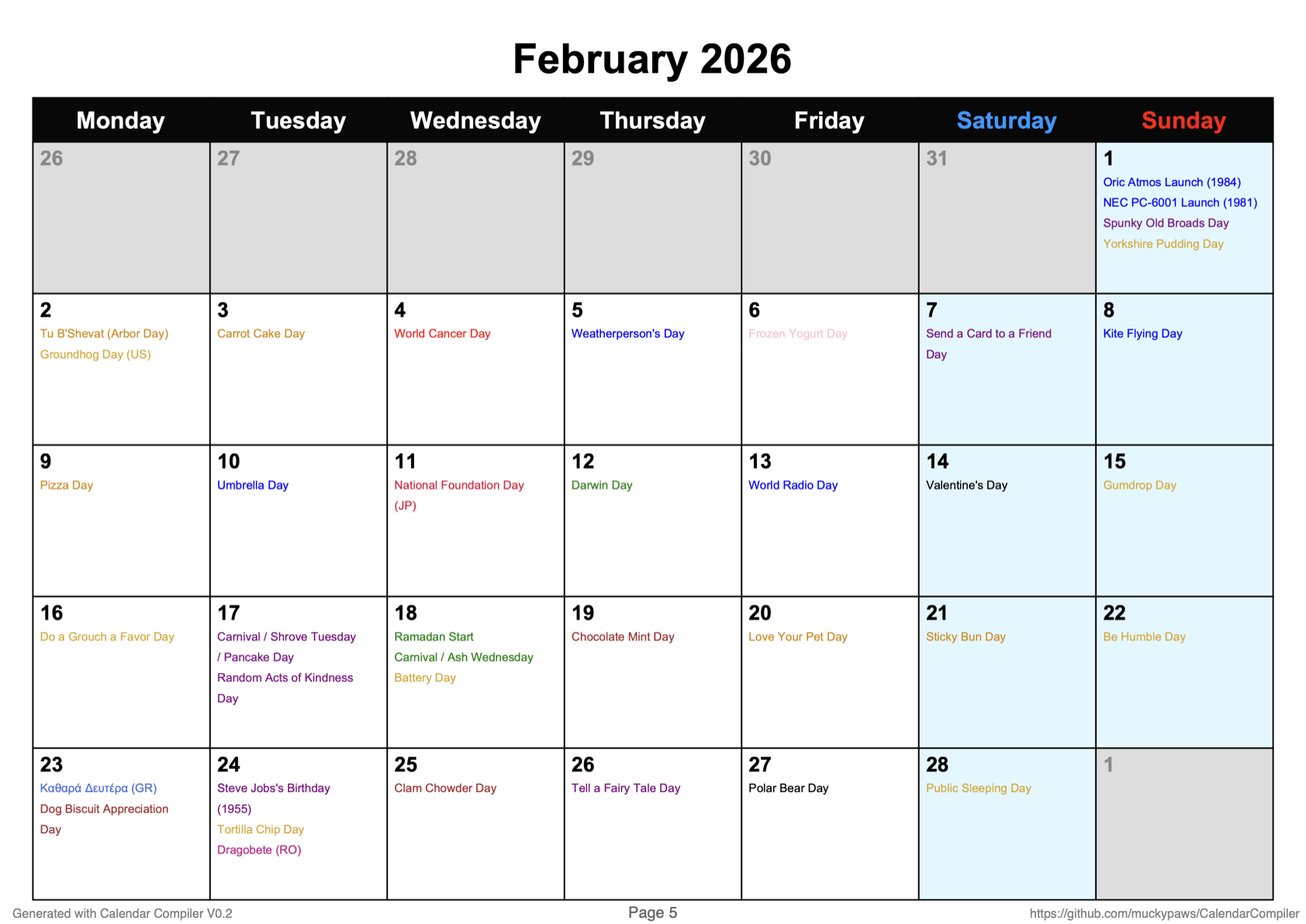
The Journey from Manual to Automated
By the end of 2024, life got busy and I didn’t have time to make the 2025 calendar manually. But I didn’t want to let people down for 2026 and beyond… and I definitely didn’t want to do it manually ever again.
While recovering from knee replacement surgery, I decided to automate the whole process. At first, I just wanted to generate SVGs for each month of the chosen year. That worked surprisingly well… but the project grew.
What started as personal automation became a fully-fledged tool capable of generating beautiful, print-ready calendars with custom events, regional holidays, and your own artwork. The community feedback that initially felt discouraging actually drove me to create something far more useful, a tool that lets everyone make the calendar they want.
I deliberately chose the loading screen from Renegade for my original CPC calendar, not just for the gorgeous colours, but because it showcased the CPC’s capabilities in a world of lazy, monochrome Spectrum ports. Plus, as an ex-hacker and lifelong rebel, it felt right to make something the Amstrad community could be proud of. Now, with CalendarCompiler, anyone can choose their own heroes.
2026 Amstrad Calendar
Want to see an example calendar created with the tool?
How to Install, Configure, and Use CalendarCompiler
Getting started is simple, even if you’re new to Python, you’ll be up and running in minutes. For a quick demonstration of the tool in action, check out the video here:
1. Download the Project
You can either download the source as a ZIP from GitHub, or clone the repository directly:
- Download ZIP: Go to https://github.com/muckypaws/CalendarCompiler and click the green Code button, then Download ZIP. Unzip the folder to your preferred location.
- Or, clone via Git:
git clone https://github.com/muckypaws/CalendarCompiler.git
2. Install the Requirements
Navigate to the project folder in your terminal and install the dependencies (preferably in a Python 3.9+ virtual environment):
macOS/Linux:
python3 -m venv venv
source venv/bin/activate
pip install -r requirements.txt
Note: If you encounter errors related to missing Cairo binaries (a dependency for PDF and image output), you will need to install Cairo separately:
- Linux (Debian/Ubuntu):
sudo apt-get install libcairo2
- macOS (with Homebrew):
brew install cairo
- Windows:
- Download the latest Cairo DLL and runtime binaries from https://github.com/tschoonj/GTK-for-Windows-Runtime-Environment-Installer/releases
- Add the DLL directory to your PATH, or place the required DLLs in the project folder.
For more details, see the project README or the Python package documentation for pycairo and cairosvg.
3. Run with the Built-in Defaults
You can test CalendarCompiler straight away with the built-in defaults. This will generate a calendar using the example configuration and artwork:
source venv/bin/activate
python CalendarCompiler.py --open
The --open flag automatically opens the generated calendar after it’s built.
4. Customise Your Calendar
- Edit
settings.jsonto set your preferred year, artwork, holiday regions, events, fonts, colours, and more. - Add or swap out images in the artwork directory as needed.
- You can also add custom events, birthdays, or anniversaries to be included in your calendar.
Full details and tips are in the included README.md, or ask for help via the GitHub issues page if you get stuck:
https://github.com/muckypaws/CalendarCompiler/issues
Windows Users
On Windows, the steps are very similar. In Command Prompt or PowerShell:
python -m venv venv
venvScriptsactivate
pip install -r requirements.txt
To run CalendarCompiler on Windows:
venvScriptsactivate
python CalendarCompiler.py --open
The --open flag will attempt to open the generated calendar PDF using your system’s default application.
Key Configuration Essentials: Tailoring Your Calendar
CalendarCompiler is designed to be flexible and personal, letting you decide which events, holidays, and countries appear in your calendar. Here’s a quick guide to the main ways to customise your build, with references to both settings.json and static_dates.py for more advanced tweaks.
1. Personal Events: Anniversaries, Birthdays, Holidays, and More
- The file
static_dates.pycontains a function calledcustom_events(year: int), which holds user-editable events. - Add or edit entries in the
basedictionary using the MM-DD key format. Each entry needs a label and a colour. Example:
  base = {
      "01-19": {"label": "Brew Monday", "colour": "blue"},
      "02-14": {"label": "Valentine's Day", "colour": "Red"},
      "03-14": {"label": "Pi Day", "colour": "goldenrod"}
  }
- Events added here will automatically appear in your calendar if
custom_eventsis enabled insettings.json.
2. International Days and “Day Of…” Events
- To include or modify global/international observances, edit the
international_dates(year: int)function instatic_dates.py. - This dictionary works just like
custom_events, edit or add MM-DD keys, labels, and colours. - Control inclusion from
settings.jsonunder theinclude_daysblock:
  "include_days": {
    "international": true,  // set to true to include
    ...
  }
3. Country & Regional Holidays
- To add or remove countries/regions, adjust the
include_country_listblock insettings.json:
  "include_country_list": {
    "countries": ["FR", "ES", "DE", "PL", "TR", "RO", "NL", "AT", "AU"]
  }
- The compiler uses ISO country codes (and region codes, e.g., AU-NSW) to fetch public holidays for your selected countries.
4. Holiday, Religious, and Retro Event Inclusion
- The
settings.jsoninclude_daysblock lets you switch each major holiday/event group on or off with a simple true/false:
  "include_days": {
    "international": false,
    "retro": true,
    "religious": true,
    "uk_holidays": true,
    "country_list": true,
    "custom_events": true
  }
5. Regenerate to Apply Changes
After making edits, just re-run the compiler:
python CalendarCompiler.py --open
Any changes you make in settings.json or static_dates.py will be reflected in the newly generated calendar files.
Tip: You can experiment and regenerate as often as you like, no risk to your artwork or previous configs.
Power Tip: Tailor Fonts, Colours, and Layout
You’re encouraged to experiment with all aspects of the configuration! The settings.json file allows you to adjust not just dates and events, but also fonts, text sizes, weights, and colours for nearly every calendar element.
For example, you can tweak:
"days_of_week": [
  {"label": "Monday",    "font": "Arial", "fontsize": 16, "weight": "bold", "colour": "#ffffff"},
  {"label": "Tuesday",   "font": "Arial", "fontsize": 16, "weight": "bold", "colour": "#ffffff"},
  {"label": "Wednesday", "font": "Arial", "fontsize": 16, "weight": "bold", "colour": "#ffffff"},
  {"label": "Thursday",  "font": "Arial", "fontsize": 16, "weight": "bold", "colour": "#ffffff"},
  {"label": "Friday",    "font": "Arial", "fontsize": 16, "weight": "bold", "colour": "#ffffff"},
  {"label": "Saturday",  "font": "Arial", "fontsize": 16, "weight": "bold", "colour": "#0099ff"},
  {"label": "Sunday",    "font": "Arial", "fontsize": 16, "weight": "bold", "colour": "#ff0000"}
],
"weekday_box_colour": "#080808",
"invalid_cell_colour": "#dddddd",
"weekend_colours": {
  "saturday": "#d3f5ff",
  "sunday": "#d3f5ff"
},
"day_number": {
  "font": "Arial",
  "fontsize": 14,
  "weight": "bold",
  "colour": "#000000"
},
"event_text": {
  "font": "Arial",
  "fontsize": 8,
  "weight": "normal",
  "colour": "#000000"
},
"month_header": {
  "font": "Arial",
  "fontsize": 28,
  "weight": "bold",
  "colour": "#000000"
},
"pdf_metadata": {
  "title": "Calendar",
  "author": "Jason Brooks - www.muckypaws.com",
  "subject": "Calendar Generator by Jason Brooks",
  "keywords": "calendar, svg, holidays, printable"
},
"branding": {
  "show_branding": true,
  "show_page_numbers": true,
  "branding_text": "Generated with Calendar Compiler V0.2",
  "branding_url": "https://github.com/muckypaws/CalendarCompiler"
},
"api_key": "USE_ENVIRONMENT"
Don’t be afraid to experiment, change fonts, colours, box sizes, event text, or even add your own branding and PDF metadata. You can always regenerate until your calendar looks just right!
Note: CalendarCompiler is under active development! For the latest information, updated configuration options, and new features, always refer to the GitHub repository:
https://github.com/muckypaws/CalendarCompiler
Configuration file structure and available options may evolve as the program grows.
Show Off & Contribute!
Have you made a calendar you’re proud of?
Share your designs, feedback, or creative hacks with the community!
Post your screenshots, printouts, or config ideas on your favourite retro forums, or open an issue or pull request at:
https://github.com/muckypaws/CalendarCompiler
UI/UX devs wanted!
If you’re a developer, designer, or just keen to help make CalendarCompiler even more accessible, contributions are always welcome. Ideas for a graphical interface, web version, or new export features? Fork the repo or get in touch!
If you wish to buy me a coffee, that would be awesome too!
Make a one-time donation
Make a monthly donation
Make a yearly donation
Choose an amount
Or enter a custom amount
Your contribution is appreciated.
Your contribution is appreciated.
Your contribution is appreciated.
DonateDonate monthlyDonate yearly
 www.muckypaws.com
1 Comment »