
One Password to Rule Them All? Why That’s a Terrible Idea in 2025
TL;DR – Too Long; Didn’t Reuse (hopefully)
Still using the same password everywhere? In 2025, that’s a fast track to trouble.
- Password reuse is dangerous. One breach can unlock everything.
- Credential stuffing is real. Attackers test leaked logins on thousands of sites—in seconds.
- Recent breaches prove it’s still happening. 23andMe, Xfinity, Hertz, and the British Library have all had major data leaks in the past year.
- Use a password manager. It’s already built into your phone and syncs across devices.
- Turn on 2FA. One extra code can stop a hacker cold.
- Check Have I Been Pwned. Know if your data’s out there—and take action.
👉 You don’t need to be technical. You just need to start.
Prefer to Watch instead of Read?
Check out the narrated version on YouTube
One Password to Rule Them All? Why That’s a Terrible Idea in 2025
Every so often, I hear something that genuinely surprises me.
Lately, I’ve been reminded—more than once—that in 2025, plenty of people are still using the same password for everything.
Not a variation. Not a passphrase. Literally the same password across every account.
When I ask why, the answers are always the same:
“There’s just too many to remember.”
“I’m not sure password managers are safe.”
“It’s complicated.”
Honestly? I get it. But that doesn’t make it any less risky.
And it’s not about being clever or tech-savvy—it’s about understanding how the landscape has changed.
So let’s talk about why this habit is more dangerous than ever… and what you can do to stay safe without giving yourself a headache.
The 90s Called—They Want Their Password Habits Back
Back in the 1990s, you might’ve had a single email account, maybe a login for your dial-up provider, and that was about it. Your digital footprint was tiny, and honestly, the risks were too.
Fast forward to today?
You’ve got shopping accounts, social media, streaming services, banking, utilities, government logins, health portals… even your coffee order is saved somewhere online.
Using the same password everywhere in 2025 is like using one key for your house, car, bike lock, office, and diary—and then leaving it under the doormat.
We’re not living in a simpler time anymore. And the people looking to break in? They’re counting on that.
Cybercriminals—often called threat actors in the cybersecurity world—are constantly scanning for weak points… and reused passwords are a goldmine.
Here’s What Hackers Actually Do With Your Password
Let’s say one website you use gets breached. Doesn’t matter if it’s some dusty old forum from years ago—if your login details were part of the leak, they’re out there now.
And if you reused that password on Amazon, your email, or your bank account?
Well… now someone else might be able to get into all of those too.
This technique is called credential stuffing.
It sounds technical, but it’s not. Cybercriminals—or “threat actors” as we sometimes call them—take a known email and password combo and use freely available tools to test it across thousands of popular websites.
And they’re not doing this slowly.
These tools can fire off hundreds of login attempts in seconds, not days or weeks like in the past. What used to require specialist skills or underground connections is now alarmingly easy to get hold of.
You no longer need to be some elite hacker—just someone with a bit of curiosity and the wrong intent.
If your password’s been leaked and reused, it’s not a matter of if someone tries it—it’s when.
How Do You Know If You’ve Been Breached?
You might already have been—and honestly, you wouldn’t be alone.
Millions of people have had email addresses and passwords leaked over the past decade without even realising it.
I still remember the first major breach I came across—Adobe.
This one had my own email address in it… eeek. That was my wake-up call.
Since then, there’ve been countless others: LinkedIn, Facebook, Deliveroo, Dropbox, eBay, Ticketmaster… the list goes on.
And these aren’t rumours—they’re widely reported in the press and verified by security researchers. BBC, The Verge, Wired, and others regularly cover this.
What kind of data leaks out?
Often it’s your email address and password—but it can also include things like your home address, phone number, date of birth, or even stored payment details.
Every breach is different, but the more information that gets exposed, the easier it becomes for someone to impersonate you, break into other accounts, or even commit fraud.
There’s a brilliant free tool called Have I Been Pwned that lets you check—safely—whether your email or password has appeared in a known breach. Just type in your email, and it’ll show you where your data has turned up.
This isn’t about scaring you. It’s about giving you a heads-up so you can do something about it.
That might mean changing a password—or turning on something called two-factor authentication (2FA).
2FA adds an extra layer of security by asking for something else—like a code sent to your phone—when you log in. Even if someone gets your password, they can’t access your account without that second step.
And the best part? If a website supports 2FA, it usually takes less than a minute to turn on.
You’ll often find the option under Account Settings → Security → Two-Factor Authentication or Login Verification.
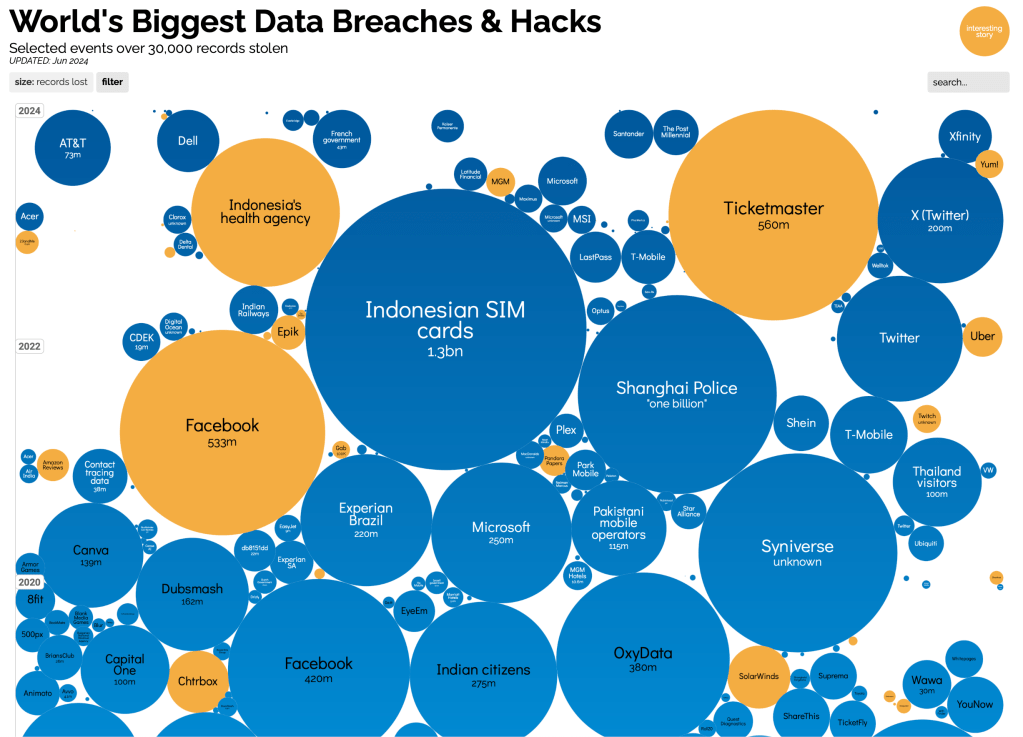
If you want a visual reminder of how common data breaches are, take a look at Information Is Beautiful’s breach map.
It’s a lot to take in… but that’s exactly why it matters.
So, Are Password Managers Safe?
This comes up a lot—and it’s a fair concern.
“Why would I put all my passwords in one place? Isn’t that more dangerous?”
It sounds risky at first… but it’s actually far safer than using one password everywhere.
Think of a password manager as a secure vault—locked with your fingerprint, face, or a single master password. Inside that vault, each site or service has its own unique key. So even if one door gets kicked in, the others stay shut.
The best part? You probably already have one on your phone.
Apple devices use Keychain, Android users have Google Password Manager—and both are encrypted and tightly integrated with your device’s security.
But what if you need a password on your laptop?
No problem—these tools sync securely across your devices, as long as you’re signed into the same Apple or Google account.
- On Apple, Keychain works across iPhone, iPad, and Mac via iCloud.
- On Android, Google Password Manager syncs with Chrome on your laptop—even if you’re using Windows.
Just make sure you’re signed into the same Google account in Chrome, and your saved logins will follow you.
So whether you’re logging into Netflix from your phone, laptop, or tablet, your password manager already has you covered.
And if you’re using a mix of devices—or want something even more flexible—there are excellent third-party options like Bitwarden and 1Password.
They work across Android, iOS, Windows, macOS, and most browsers, and they’re built with strong end-to-end encryption—meaning even the companies behind them can’t see your data.
💡 Worried about security?
Good password managers encrypt everything using industry-standard techniques. Even if someone got hold of your device, they’d need your master password, fingerprint, or face to unlock it.
Compare that to reusing the same password everywhere—if just one site gets breached, everything else is suddenly wide open.
You don’t need to install anything fancy, subscribe to anything premium, or become a tech wizard.
Just start using the tools already in your pocket—and let them do the heavy lifting.
Tips for Staying Sane (and Safe)
🛡️ Use a password manager.
Start with the one already built into your phone. It’s safer, faster, and easier than trying to remember everything yourself.
🔔 Turn on Have I Been Pwned alerts.
Get notified if your email appears in a future data breach—so you can act fast.
🔒 Enable 2FA wherever possible.
That second layer of security (usually a text message or app code) can be the difference between a blocked login and a stolen account.
📧 Use separate emails for important stuff.
Consider a dedicated email for banking, shopping, or government logins. It adds an extra layer of separation if one address is ever compromised.
📝 Keep an eye on your digital footprint.
Old accounts still pose risks. If you no longer use a service, consider deleting it—or at least updating the password.
💬 Share what you’ve learned.
If this post helped you, pass it on to a friend or family member who might still be using “fluffy123” for everything. You might just save them a world of hassle.
Final Thought: One Key Shouldn’t Open Every Door
You wouldn’t use one key for your house, your car, your office, and your gym locker… and then leave it lying around.
But that’s exactly what reusing the same password does online.
You don’t need to become a cybersecurity expert—you just need to take a few small steps to make your digital life a whole lot safer.
The tools are already in your pocket. The risks are real. And the fixes? They’re easier than you think.
For Those Who Still Seek Knowledge…
A curated list of verified sources from the realms of breach and shadow.
🔐 Recent Major Data Breaches (2023–2024)
- 23andMe Breach (October 2023):
https://blog.23andme.com/articles/addressing-data-security-concerns
https://www.hipaajournal.com/23andme-user-data-stolen-credential-stuffing-campaign/ - MOVEit Transfer Software Breach (May 2023):
https://en.wikipedia.org/wiki/2023_MOVEit_data_breach
https://www.cisa.gov/news-events/cybersecurity-advisories/aa23-158a - Xfinity Data Breach (October 2023):
https://apnews.com/article/xfinity-data-breach-customer-information-bfe6d266df1c3570f7f9005c8bb9cfed
https://www.infosecurity-magazine.com/news/xfinity-discloses-data-breach-36/ - Hertz Data Breach (October–December 2024):
https://www.theverge.com/news/648741/hertz-customer-data-breach-hackers-cleo-vulnerability
https://www.reuters.com/technology/cybersecurity/hertz-says-hackers-stole-its-customer-data-2025-04-14/ - British Library Ransomware Attack (October 2023):
https://www.bl.uk/cyber-incident/
https://www.theguardian.com/technology/2023/nov/24/rhysida-the-new-ransomware-gang-behind-british-library-cyber-attack
🔓 Notable Historical Breaches
- Adobe Breach (2013):
https://krebsonsecurity.com/2013/10/adobe-breach-impacted-at-least-38-million-users/
https://haveibeenpwned.com/PwnedWebsites#Adobe - LinkedIn Breach (2012 & 2016):
https://www.theguardian.com/technology/2016/may/18/hacker-advertises-details-of-117-million-linkedin-users-on-darknet
https://haveibeenpwned.com/PwnedWebsites#LinkedIn - Dropbox Breach (2012, revealed 2016):
https://www.theguardian.com/technology/2016/aug/31/dropbox-hack-passwords-68m-data-breach
https://haveibeenpwned.com/PwnedWebsites#Dropbox - eBay Breach (2014):
https://www.bbc.co.uk/news/technology-27503290 - Ticketmaster UK Breach (2018):
https://www.wired.com/story/ticketmaster-data-breach-monzo-inbenta
https://www.theguardian.com/money/2018/jun/27/identity-theft-warning-after-major-data-breach-at-ticketmaster

 www.muckypaws.com