
Drag, Drop, Disclose: When Convenience Clouds Consent
TL;DR – Cloud Convenience vs Data Consent (Adobe & Beyond)
Many popular cloud tools (like Adobe’s online PDF converter) allow users to upload documents without clearly warning that files may be stored, analysed, or used to train AI models. This post explores the hidden risks, legal responsibilities under UK GDPR, and the importance of transparent defaults.
🎧 Prefer to Listen?
✦ Introduction: The Comfort Trap
You’re in the zone. A document needs converting. And like a helpful colleague, Adobe Creative Cloud pops up:

“Turn files into PDFs. Drag and drop a Word, Excel, or image file…”
It’s fast. It’s simple. It works.
However, behind that convenience lies an increasingly common blind spot: you may be uploading sensitive information to a remote server without even realising it.
This isn’t just an Adobe issue. A quick search for “free online PDF converters” yields dozens of similar tools, such as:
- https://www.adobe.com/acrobat/online/convert-pdf.html
- https://thebestpdf.com/pdf-converter
- https://pdfguru.com/app/pdf-converter
- https://pdfexpert.com/lp-free-buy-now
- https://edit-pdf.pdffiller.com
- https://smallpdf.com/word-to-pdf
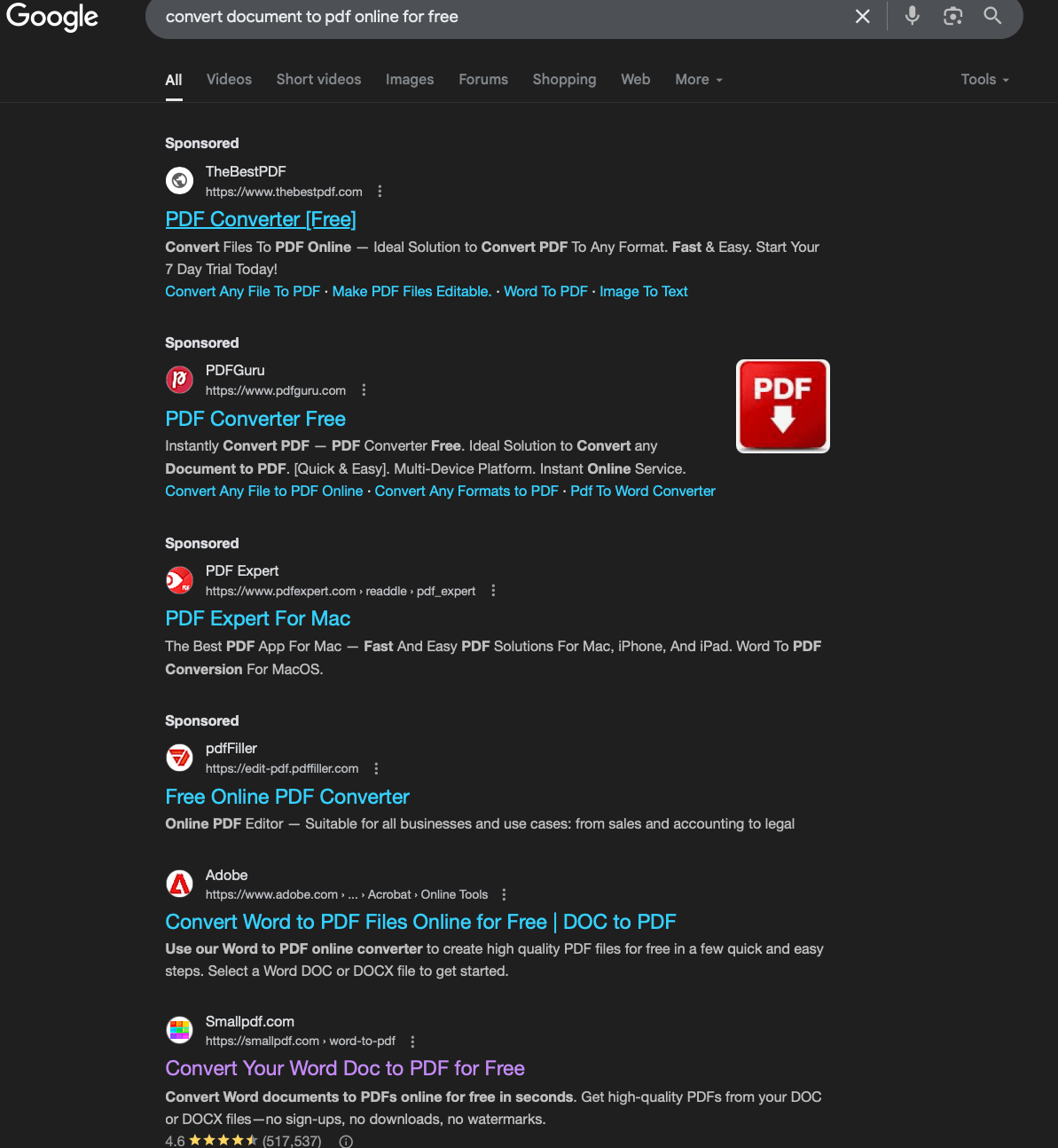
I don’t endorse these tools, and are used to simply demonstrate that many may have unclear privacy practices. Others are hosted in countries where privacy laws may be weaker or harder to understand. And very few clearly explain what happens to your file after you upload it.
In this article, I focus on Adobe’s drag-and-drop workflow not to criticise the company specifically, but to highlight a growing pattern across the tech landscape:
When convenience removes friction, it also removes transparency.
After testing Adobe’s cloud-based PDF converter and raising concerns about the lack of clear consent or data use notices, I received a prompt response from Adobe Privacy Support. They confirmed:
“Documents converted using Adobe’s free PDF conversion tool are typically deleted from Adobe servers within hours if you do not take any additional action (such as logging into your account to save the document). Likewise, Adobe does not share your content unless you utilize a feature to do so yourself.”
That’s somewhat reassuring. But it also confirms what wasn’t said up front: your file is uploaded, is temporarily stored, and might be scanned or processed internally, all without any clear message or pop-up letting you know before you upload it.
Now, let’s be clear: from a technical point of view, temporary storage is necessary. You can’t convert a document in the cloud unless it first gets uploaded and held somewhere. It’s not realistic to expect real-time, streamed conversion of files with complex layouts and embedded objects.
But that’s precisely why clarity matters. If we accept that storage has to happen, then platforms should be just as upfront about it. You’d expect that uploading a file to a major tech platform would prompt a clear message:
“This document will be temporarily stored and may be processed. Do you agree?”
Instead, users are directed straight to an upload interface, with only small-print links to privacy policies tucked in the footer.
These services can absolutely be helpful for documents that are not sensitive, things like blank templates, flyers, posters, or public documents.
But if your file contains personal information (PII), medical records, contracts, banking details, or work-related material, then the risks go up fast.
And that, right there, is the problem. We’re conditioned to trust a smooth interface. But we can’t afford to treat document uploads like accepting cookies or clicking through an app install.
It feels easy. But sometimes, the easiest option is also the least transparent.
And in an era where many of these platforms are deeply invested in AI development, advertising networks, and behavioural analytics, what happens to your document in those first few seconds might matter more than you think.
While Adobe’s response suggests files are deleted “within hours”, that’s not the whole story. The real concern isn’t just temporary file storage, it’s what may happen before deletion.
Many tech companies, including Adobe, Google, Microsoft and others, are building AI systems that learn from the way users interact with their tools. Your uploaded file may fuel:
- Content analytics: extracting layout, structure, and design data
- Training large language models (LLMs) or document classifiers
- User behaviour modelling: how often you convert, from which device, with what type of document
And while these insights may be anonymised or aggregated, they’re still built on your activity, without you being given a clear choice.
That subtle shift, from document conversion to behavioural insight, is where transparency should be strongest. And yet, for most users, it’s not even visible.
We may think we’re sending a file, but we could be training a system.
We’ll return to this in more detail shortly.
🚫 No Warning, No Consent: What You Don’t See Matters
When you upload a document to an online tool, especially one offered by a household-name tech company, you might expect a simple message like:
“This document will be temporarily stored, used for AI Training and processed on our servers. Do you consent to this?”
It doesn’t sound like much. But it matters. That moment of clarity is your only chance to make an informed decision.
Unfortunately, most services, including Adobe’s online PDF conversion page (https://www.adobe.com/acrobat/online/convert-pdf.html), skip that entirely. You’re guided straight into the upload step, with no prompt, no checkbox, and no explanation about where your document is going or how it’s being used.
For tech-savvy users, this might seem obvious. After all, files can’t be processed remotely without being uploaded and temporarily stored. Real-time streaming of Word documents, especially those with formatting or embedded objects, simply isn’t feasible.
But that’s not obvious to everyone. The average user may assume the task is handled locally, especially if the interface looks like a simple desktop function. They aren’t told their file is crossing borders, landing on a server they can’t see, or possibly being scanned by systems they didn’t authorise.
That’s where transparency becomes essential.
Under the UK General Data Protection Regulation (UK GDPR) and the Data Protection Act 2018, users must be informed at the point of data collection, not buried in footer links. And if processing includes profiling, analytics, or retention, users must also be given a clear right to object or opt out.
The absence of that information isn’t just a design flaw, it may also represent a legal and ethical gap.
🧾 The GDPR & DPA 2018 Perspective: Where the Law Draws the Line
While technical convenience is understandable, legal compliance is non-negotiable.
Under UK GDPR and the DPA 2018, any organisation collecting personal data, even for a few minutes, has certain obligations. These laws aren’t just for big breaches. They’re designed to protect you even during small interactions.
Here’s where the current experience with cloud-based upload services can fall short:
1) Lack of Just-in-Time Notices
Article 13 of UK GDPR requires that data subjects be informed at the time their data is collected, especially when done directly. That means:
- What data is being collected
- Why it’s needed
- Who it’s shared with
- How long it’s retained
A tiny footer link doesn’t meet this standard. If you’re dragging a document into an online tool and aren’t told this information beforehand, that’s a transparency gap.
2) Lawful Basis for Processing
To process any personal data, the organisation must have a lawful basis. The two most likely ones here are:
- Consent (freely given, specific, informed, and unambiguous)
- Legitimate Interests (where processing is necessary and doesn’t override user rights)
But neither are automatic. If analytics, telemetry, or scanning occurs in the background, and the user isn’t made aware or given a chance to object, that may violate Article 6.
3) The Right to Object (Article 21)
Even if Adobe or others rely on “legitimate interests” for things like system improvement or analytics, users still retain a right to object. But:
- If there’s no notice, how can they object?
- If there’s no opt-out, how can that right be exercised?
It’s not enough to bury this in a static privacy policy. These rights must be actionable and meaningful at the point of use.
💬 GDPR in Plain English: What It Means for You
Let’s break this down simply, because not everyone has the time or patience to decode regulatory language:
When you upload a file, you’re handing it to a stranger. You should be told what they plan to do with it.
If they scan or study your file (even automatically), they should say so up front.
You should be offered a real choice about whether to let them do that, not buried in links or small print.
Even if it’s “just temporary”, that doesn’t mean your data can’t be copied, analysed, or used in ways you didn’t expect.
You have rights: to know what’s happening, to say no, and to expect honesty. If those rights aren’t respected, something’s wrong.
This is what the law (and basic decency) aims to protect. But it only works if we know what to ask.
🧠 From PDF to Profile: How Uploads May Feed the AI Engine
Before the explosion of generative AI, online document tools were often single-purpose and relatively simple: convert a file, download the result, done. Risks still existed, especially around where data was sent and who hosted the service, but the scope of what could happen to your document was limited.
Now, that landscape has shifted dramatically.
Let’s zoom out. Even if your document is deleted in a few hours, what happens before that?
Increasingly, major tech companies, Adobe included, are investing heavily in artificial intelligence, machine learning, and data-driven personalisation. When you upload a file, you may be triggering far more than just a conversion:
- Automated document analysis to extract layout, structure, and content features
- Behavioural analytics based on file types, usage patterns, or conversion frequency
- Model improvement using aggregated (but derived) document insights
- Metadata retention tied to device, region, or user behaviour
Adobe’s own privacy policy refers to “content analytics” and telemetry, and although opt-outs may exist for logged-in users, the upload screen shows no such options.
The concern here isn’t just about whether your specific file is read. It’s about whether your interactions feed a system that’s continuously learning from aggregated user data, without you ever being told.
And as more platforms build multi-purpose AI systems, trained on documents, emails, images, and behaviours, the line between a helpful service and a hidden data funnel continues to blur.
In the AI era, even transient data can become a permanent insight.
This doesn’t mean we should stop using online tools altogether. But it does mean we should demand better transparency, especially from companies leading the charge into AI.
Just because it’s easy, doesn’t mean it’s harmless.
🤖 Sol’s Take: From Utility to Insight Pipeline
Reviewing Adobe’s global and UK privacy policies, it’s clear that deletion and data minimisation are part of their process. But what’s less visible is the potential for behavioural and document-level analysis that occurs before deletion.
In a privacy engineering context, the absence of a just-in-time notice, especially when uploading without logging in, limits user autonomy. Even if the document itself is deleted, metadata or behavioural signals could still be retained.
This isn’t just an Adobe issue. It reflects a broader ecosystem trend where once-discrete tools now feed into ever-growing AI pipelines, analytics engines, and user modelling systems.
Convenience should never come at the cost of clarity.
🧭 Part 1: Convenience Isn’t Always a Choice — But Transparency Must Be
It’s easy to say “just don’t use online tools”, but for many users, especially on mobile or tablet devices, there may not be another option.
macOS users might have Preview. Windows users can print to PDF. LibreOffice, OpenOffice, and other desktop suites offer built-in export tools. But if you’re on a smartphone and just need to convert a document quickly, you’re more likely to reach for whatever Google throws up first. And that often means a cloud-based tool.
That’s where the power imbalance begins. You didn’t choose cloud processing because it was better. You chose it because it was there. Because the alternative wasn’t.
This is why transparency is so essential, not just for the tech-savvy, but for anyone pushed toward cloud convenience by default.
Platforms like Adobe’s PDF converter may delete documents after upload, but that doesn’t mean the data journey ends there. Metadata, behavioural insights, or usage patterns could still be retained or analysed. And with many platforms now feeding into generative AI and machine learning pipelines, even short-lived uploads may inform much larger systems.
🧭 Part 2: When Training Never Forgets, AI, Analytics, and PII Exposure
In reviewing Adobe’s global and UK privacy policies, deletion and data minimisation are clearly stated. But what’s less visible, and often buried in broader analytics or AI documentation, is the potential for:
- Behavioural tracking
- Document layout and structure analysis
- Model training inputs
- Cross-service user profiling
Even without explicit content review, your interaction with the tool may contribute to system improvement, user modelling, or training future AI, all before your document vanishes.
This isn’t just an Adobe issue. It reflects a broader ecosystem shift where once-discrete tools now feed into insight pipelines, analytics engines, and learning models.
And here’s the unsettling reality: in an AI era, even if your file is deleted, what it taught the system might not be. Worse still, if documents containing sensitive or personally identifiable information are inadvertently swept into model training, the consequences may be deeply personal.
Imagine your bank statement, divorce records, or medical diagnosis accidentally reappearing, not in a breach, but hallucinated into someone else’s AI-generated novel, chatbot dialogue, or training prompt.
This is not science fiction. It’s an emerging risk. One that privacy frameworks are only just beginning to address.
🛍️ Final Thoughts: Clarity Isn’t Optional
That’s why informed decision-making is so important.
If a platform requires your document to be uploaded, processed, or stored, especially for free, it should say so clearly, and offer meaningful choices.
- Transparency isn’t a luxury. It’s a legal requirement, and a trust imperative.
- This is a call for better defaults:
- Clear privacy prompts
- Upfront data handling explanations
- Real choices about analytics and profiling
Until then, treat every upload, even for something as basic as a file conversion, with the same caution you would when handing over your passport.
You’re not just sharing a file. You’re offering a glimpse of who you are, what you value, and how you work.
And in the hands of powerful AI and analytics systems, even that can go further than you ever intended.
Convenience shouldn’t come at the cost of clarity. But right now, too often… it does.
🔎 Suggested Reading and References
https://www.adobe.com/uk/privacy/policy.html
https://www.adobe.com/privacy/opt-out.html
📣 We’d Love to Hear From You
Have you used Adobe’s online converter or similar drag-and-drop services? Did you notice any privacy warnings? Have you ever had concerns about what happens to your files in the cloud?
Share your thoughts below, or get in touch directly. Your feedback helps shape future content, and might just help others make more informed decisions too.
You can also request a template letter if you’d like to contact a provider about their data handling practices.
