
GreaseWeazle Trouble Shooting Update – Amstrad 3″ Disks
This is a follow up article to https://muckypaws.com/2020/09/03/greaseweazle/ where I’ll covering off a common issue that can be experience when using an Amstrad FD-1 External 3″ Drive.
Reading Track 0.0...Command Failed: GetFluxStatus: No Index
![Image may contain: text that says "jason@Jasons-iMac Greaseweazle-vo.20% Greaseweazle ./gw read Amstrad/disk1.scp Greaseweazle v0.20 [F7], Host Tools v0.20 Reading Track 0.0. .Command Failed: LuxStatus: No Index"](https://scontent-lht6-1.xx.fbcdn.net/v/t1.0-9/118652291_10160295195429056_217572488997672938_n.jpg?_nc_cat=108&ccb=2&_nc_sid=b9115d&_nc_ohc=k5tQkphRlXwAX8tfWrj&_nc_ht=scontent-lht6-1.xx&oh=69a6fc3c38818fddf67414c7ed20dbca&oe=6038C9BB)
The most common causes for this error are as follows :-
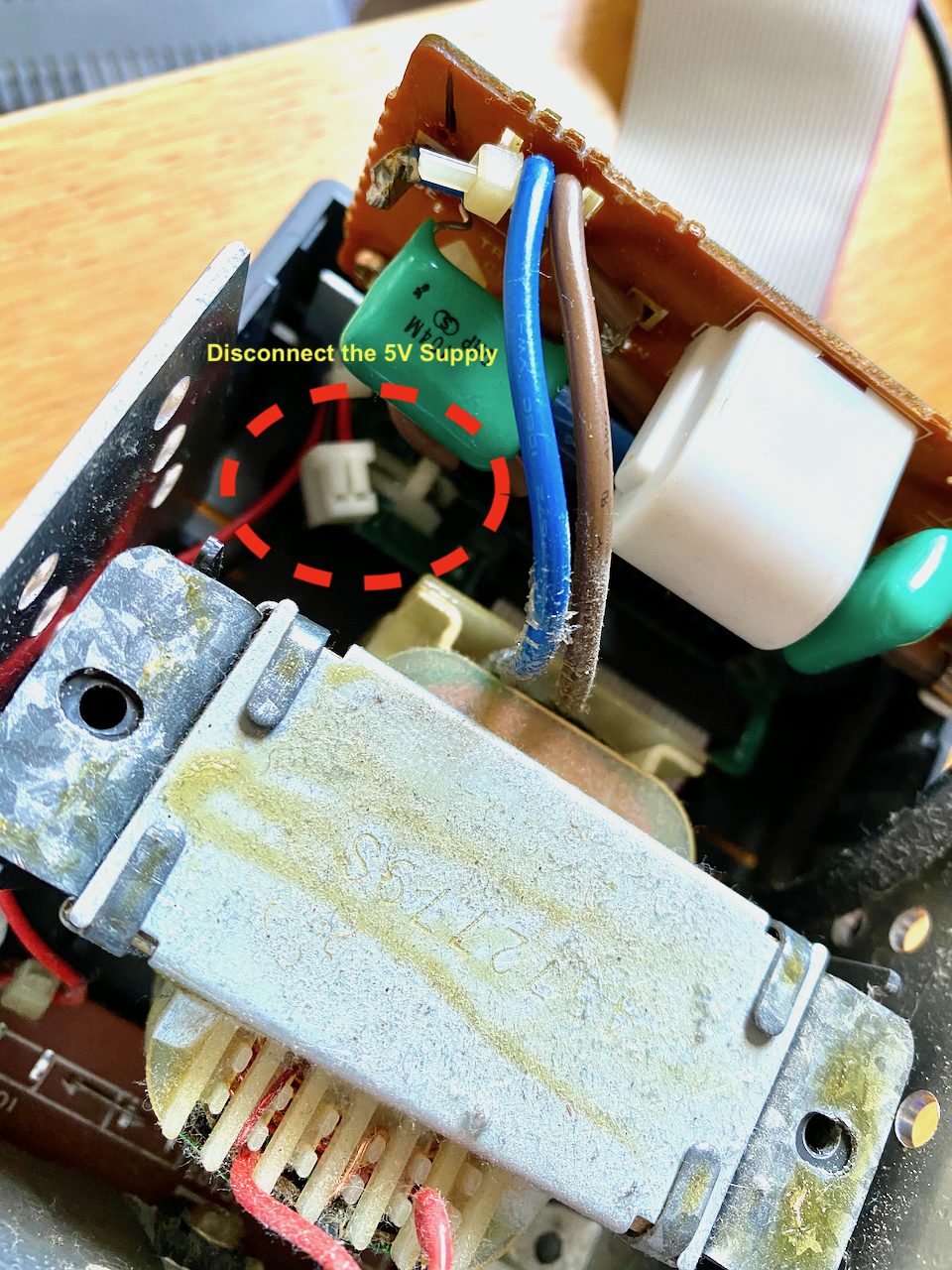
- Have you disconnected the 5V Power Cable inside the FD-1 External Unit? This must be done to protect the GreaseWeazle (remember to put it back when you’ve finished with it).
- The 34Pin FDC Cable is upside down.
- The official cable works correctly as supplied, however you will need to file the Key from the Connector to insert the cable into the Drive upside down.
- If the cable is upside down you will hear the drive spinning and the front red LED Light will be permanently lit (switch one of the connectors upside down).
- Do not use the Middle connector on a dual drive cable (The one with the twisted cable for Cable Select, as seen on older PC 3.5″ Disks). The Amstrad FD-1 Drive is permanently jumpered to act as Drive B, they were expected to be connected to an Amstrad CPC664/6128 as a secondary drive (Disc controller wasn’t required).
- Note: I don’t have a DDI-1 and Drive to test the combination for 464 users.
- Check the command syntax
./gw read --revs=5 --drive B --ecyl=39 --single-sided diskfilename.scp
- If you believe the drive is configured as A
./gw read --revs=5 --drive A --ecyl=39 --single-sided diskfilename.scp
- If that doesn’t work, there may be a more fundamental issue with the Drive. Remove the top half of the case (with the drive powered off and unplugged). Reconnect the hardware and check that BOTH the disk and the drive motor spin
- If the drive hasn’t been used in 20+ years the drive belts tend to liquify into tar, in which case you’ll need to order a replacement https://www.dataserve-retro.co.uk/contents/en-uk/p15.html or the drive service kit: https://www.dataserve-retro.co.uk/contents/en-uk/p351.html
- I’ll upload a video showing the process of replacing the belt, though be aware there’s two major model designs, one with a mechanical write pin, the other with optical. The mechanical write pin version is a real PIA to deal with, but doable.


 www.muckypaws.com
Thanks a lot for this very interesting post. I also have about a dozen of old 3″ CPC disks with games, data and own BASIC programs still here that I want to restore and also have an FD-1 drive (currently with broken belt, but replacement belt is on its way). I have ordered the Greaseweazle now, but am unsure about the data cable that I need. Do I get you right that I just need a 1:1 connected cable (34 pin obviously) without any twists? Like one of these should do it: https://www.ebay.de/itm/132895589308 or https://www.amazon.de/sourcing-map-Mehrfarbig-flexibel-Flachbandkabel-Rainbow-Color/dp/B07H25YBK5/ ? Thanks!
LikeLiked by 1 person
I got my Greaseweazle in the meantime and it is working. The 1:1 connected cable does the track. I noticed that on some disks, some tracks need several attempts to read (not use if it’s the FD-1 or the disks causing these read issues). Therefore, I currently use raw format where each track is in its own file, so that I can simply re-read the tracks with a bad CRC.
LikeLike
Hi Peter, Thank you for your message, apologies I’ve been away for two months post complex surgery. It’s good to hear you got it working, I had to file down the key on one of my cables to get it to work. I’ve been able to use SCP and then HXE to convert to .DSK formats for loading into emulators, and SCP files for re-imaging disks, which worked well with some of the older copy protection mechanisms. I still have a 100 odd disks left to archive.
LikeLike
Thanks for your reply, MuckyPaws. I hope all is going OK for you now. In respect to the Amstrad disks and the Greaseweazle, I can confirm that it works very well for reading protected disks. I have a few commercial games here that are protected with the famous Speedlok 6K/8K, and on the CPC itself I was never able to make a backup of these disks. With the Greaseweazle it was no problem to read them in. Today I opened my FD-1 again and did another attempt to clean it from the “remains” of the old belt. Apparently I did now a better job than when I tried it the first time. The drive runs now much more flawlessly, creating less bad sectors that need to be re-red.
LikeLike
Hello Jason,
today I trying to make same operation with a dd1 drive, (with new belt)
First test : greaseweazle USB Connection /pc – ok
Secondary test : greaseweazle and dd1 connection with the IDC 34pins
But after connection the greaseweazle don’t ‘work and the blue led activity now still lignt on !!I
After retest with cmd : GW info
There is no return of the drive
think my GW have a trouble shooting
LikeLike
Hey,
Thanks for your message.
The DD1 interface was an add on card for a 464 which in turn connected to the FD1 Disk Drive. I’m assuming the drive works correctly when connected to your CPC? if so, you need to connect the greaseweasle directly to the drive and not the DD1 interfacecard.
Secondly, you need to disconnect the 5V Connector inside the drive itself. https://muckypaws.com/2020/09/03/greaseweazle/ There’s a photo in my article showing where it is once you’ve opened the drive up.
I created a brief troubleshooting guide here: https://muckypaws.com/2021/01/27/greaseweazle-trouble-shooting1/ if you’ve disconnected the 5V supply inside the drive unit.
I hope this helps.
Kind Regards
LikeLike
Hello Jason
Thanks for your reply.
I wrote DD1 because it says DD1 under my drive. Okay, I connected it without the interface…
So, indeed, I hadn’t disconnected the 5V. Unfortunately, I fried the Bluepill board.
now I bought a new board with an STM32 flasher , and now CMD /gw info it’s working again.
https://image.noelshack.com/fichiers/2026/03/1/1768242113-gw-info.png
I’ll try again this weekend with my FD1 floppy disk drive
thank you for your advice !
LikeLiked by 1 person
hello it’s me again , the greaseweazle is repaired ;
first test : command gw info is running !!
secondary test : command gw read test.scp ; défaut no index… so i reversed the 34 pins cables .
third test : command gw read test.scp ; defaut track 0 not found..The red LED flashes on the disc drive, the motor runs for 1 or 2 second and then stops.
i think , I’m going to get out my CPC 464 to retest my floppy drive to see if the problem is coming from there.
If you have any other ideas, you can suggest them to me,
thank you my friend
MIC
LikeLiked by 1 person
I’m away at the moment so don’t have my drive and GW to hand until next week.
Assuming you’ve replaced and/or checked the drive belt (which tend to turn to mush).
I created this trouble shooter https://muckypaws.com/2021/01/27/greaseweazle-trouble-shooting1/
Unsure if you’ve looked at this. It may help.
LikeLike
Hello,
today I tested my dd1 floppy on the cpc464, it works perfectly
Here’s a picture of the greaseweazle, do you think the problem is the 34-pin connector twist ?
LikeLiked by 1 person
I don’t see a picture, though you can email via the about/contact page.
With my cable I had to file the key off the connector to reverse it for correct orientation. May have been because of the one purchased ( I don’t remember)
Contact me with your email address and we can pick this up. Will be home Monday.
LikeLike
Oops, sorry for picture, I hope you will can see now 😊
Same for me ihad to file the key off the connector to reverse it for correct orientation,
I wanted to talk about the twist that allows you to be in floppy A or B
LikeLike
LikeLike
good news ;
I replaced the pin 34 cable with a straight one; it’s much better. Now, when I send a command, the drive starts.
I reused the cable from my old 3.5-inch drive that was plugged into my CPC 6128….
I tried the commands you suggested, but they don’t work for me.
gw read –revs=5 –drive A –ecyl=39 –single-sided diskfilename.scp ; gw read: error: unrecognized arguments: –ecyl=39 –single-sided
so i removed somes arguments..
gw read –revs=5 –drive A diskfilename.scp ;
C:UsersmickaDownloadsfusion 2 et 3>gw read –revs=5 –drive A diskfilename.scp
Reading c=0-81:h=0-1 revs=5
T0.0: Raw Flux (0 flux in 0.00ms)
T0.1: Raw Flux (0 flux in 0.00ms)
T1.0: Raw Flux (0 flux in 0.00ms)
T1.1: Raw Flux (0 flux in 0.00ms)…….T81.1
The file is created, it’s 11KB, that’s small, I think there’s again a flux problem
the file : https://uploadnow.io/f/L0rRv0P
LikeLiked by 1 person
Good news you’re getting a response from the drive now with the GW. At the time I wrote the articles, the firmware was at V0.24 and the command structure changed between releases, It’s now five years since I wrote that so it’s highly likely the commands may have evolved and changed. I will need to get the drive out and connect the GW up and test again, and probably update the article or publish an update.
Looking at your image, you’re connected to an Amstrad FD1, but the command is looking for both sides of the disk and 81 tracks which would push the read head beyond the maximum and possibly do some damage.
use a maximum of 41 cylinders on the FD1 3″ drive. Most disks used tracks 0-39, but back in the day I and other producers would use Track 40 and 41 for copyright protection and in my case, I’d also modify the XDPB to get around 212kb of storage space per side.
To read side B, you will need to flip the disk over.
The SCP File is a little on the lite side, I would expect to see something around the 8-11mb per file before converting it to HFE or .DSK using HxCTools.
Have you checked out Keir’s Wiki at: https://github.com/keirf/greaseweazle/wiki
Also to convert from SCP to other formats you’ll need: https://hxc2001.com/download/floppy_drive_emulator/
LikeLike